Enhancing mobile user experience with cached data

User experience is paramount in application development. This holds especially true for mobile applications like this one, which serves as an information hub for a global community of over 40k people. However, frequent data retrievals slowing down the application required a new solution to streamline user interactions. Enter the caching layer—a game-changer that optimises performance and enhances the user experience.
Use case
This community app is primarily a directory that offers read-only access to community information, such as photos, family details, and addresses. While the data seldom changes, users frequently access the same profiles multiple times. For example, a user's profile picture and personal details could be displayed in a directory list and on a detailed page. The user's details were retrieved twice for the simple scenario of searching for a user and viewing the detailed information. This repetitive retrieval of information led to a sub-optimal user experience, where the user had to wait for the profile details on the second screen, even though the same information had just been displayed, prompting the need for a caching solution to store and deliver frequently accessed data more efficiently.
Objective
The core objective of implementing the caching layer in the application was to improve user experience by reducing latency and enhancing performance. By storing frequently accessed data locally on mobile devices, the aim was to minimise the need for repeated server requests, thus ensuring faster access to information while sparing server resources. A secondary goal was to reduce load on the server.
Challenges we overcame
Implementing the caching layer posed several challenges that required careful consideration and strategic solutions. One of the primary challenges was ensuring data security and compliance with privacy regulations. Since the application handles sensitive information such as addresses and personal details, it was imperative to safeguard this data from unauthorised access. Even employing local storage encryption wasn’t secure enough for the customer since we couldn’t rule out all of the attacks based on device emulation or using debugging tools.
Additionally, striking the right balance between caching data to improve performance and ensuring that the cached information remains up to date presented a significant challenge. To address this, the development team implemented mechanisms to set expiry dates for cached data, ensuring that users always have access to the latest information while minimising the risk of outdated data.
Furthermore, optimising the caching strategy to minimise memory usage and prevent potential memory issues required meticulous fine-tuning and testing.
The successful implementation of the caching layer underscored the development team's dedication to delivering a seamless user experience while navigating complex technical requirements and considerations.
Optimised performance with a read-through cache
The caching layer was designed to be a read-through cache. With this approach, all data fetches go through the caching layer and can result in either a cache hit or a cache miss. In case of a cache miss, the caching layer retrieves the data from the server and stores it in the cache before returning it to the application.
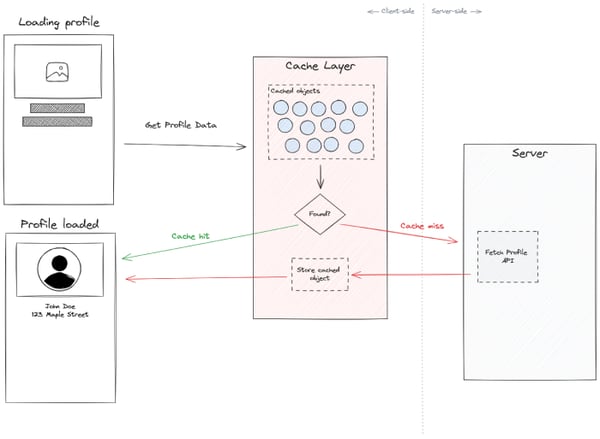
The cached objects are stored in JavaScript memory, using Map objects for constant-time retrieval. A browser interval runs periodically to remove cache entries that have already expired, freeing up memory.
To decouple the caching layer from the application logic, each cache fetch also provides a callback function that fetches the data when a cache miss occurs. This way, the caching layer is still responsible for invoking the server-side fetch, but the code to do so is provided by the application.
Additional features were implemented in this caching layer to handle partial data loading. For example, when a user views a list of profiles, the name and a low-resolution picture are shown. This information is stored in the cache. When opening the profile detail screen, even though we don’t have the full information of the profile, we can immediately display the name and a low-resolution image, until the full details are fetched. This provides visual continuity in navigation, even in the case of a cache miss, matching mobile users' expectations.
Another feature that had a significant impact on latency and usability is batch data retrieval. For example, when a carousel loads multiple profiles, the previous solution would request each profile individually, overloading the browser’s communication channel. Using the caching layer, we identified that a particular screen requested multiple profiles at the same time and optimised the data fetch into a single server request that returns all profiles. With this optimisation, we were able to display 10+ profiles simultaneously without impacting screen load latency.
Technologies used
- JavaScript: Leveraged for implementing the caching layer.
- OutSystems: For the application itself and wrapping the caching layer’s APIs.
Conclusion
Implementing the caching layer in this community app represents a significant milestone in enhancing user experience and optimising application performance. By intelligently storing frequently accessed data locally on devices, the application can deliver information to users with minimal latency, thus improving efficiency and user satisfaction. Furthermore, by adhering to best practices, such as setting expiry dates for cached data, the application ensures that users always have access to the most relevant information while minimising memory usage and resource consumption. In conclusion, the caching layer addresses performance issues and underscores the engineering prowess and commitment to delivering top-notch user experiences in application development.