Revolutionising OutSystems connectivity with Hubway Connect

Interoperability between different technologies is paramount in data analytics. However, when it comes to OutSystems applications, bridging the gap between analytics tools and data stored in the OutSystems database can be a complex challenge. Many of our clients requested an easier way to access their data, so we developed Hubway Connect. This groundbreaking solution enables seamless connectivity between OutSystems applications and leading analytics tools such as Power BI and Tableau.
Use case
The primary use case for Hubway Connect revolves around data analytics. By enabling tools like Power BI and Tableau to connect directly to OutSystems applications, users can extract and analyse data without the need for extensive development efforts. This opens avenues for advanced analytics, trend analysis, and custom reporting, all powered by the data stored within OutSystems applications.
Objective
The core objective of Hubway Connect is to empower business users with analytics tools to effortlessly extract data from OutSystems applications. By adhering to standards such as OData, Hubway Connect ensures compatibility with a wide range of analytics platforms, thereby democratising access to valuable insights without imposing additional burdens on development teams.
Extreme connectivity without development
Hubway Connect is a no-code tool that provides extreme connectivity without requiring development efforts. By serving as a gateway between OutSystems applications and analytics tools, Hubway Connect eliminates the need for manual data extraction and bespoke data access services. This no-code approach streamlines the analytics process, enabling business users to easily extract actionable insights.
Users can expose data using Hubway Connect Builder by creating projects and configuring what database objects each project exposes. Each project exposes an OData-compliant endpoint that Power BI, Tableau, or any modern Analytics tools can use. The process requires no coding and takes less than 5 minutes to expose the data model of an entire OutSystems application for consumption in Power BI.
Challenges to overcome
The OData protocol specifies how to retrieve data from resources, also known in OutSystems as entities. OData enables filtering, pagination, and sorting operations on the result set. When retrieving a result set with OData, the URL will include all of these parameters, including:
- which Hubway project is being accessed.
- which resource or entity is being queried.
- what filters should be applied.
- which attributes should be returned.
- pagination and sorting applied.
A great resource to learn OData is their basic tutorial
For example, the following OData URL can be used to query the Orders entity and return all orders placed since 01/Jan/2024:
/OrderManagement/v1/Orders?$filter=Date ge 2024-01-01
In order for Hubway to understand these requests, a runtime engine composed of 4 layers: Endpoint Resolution, URL Parser, SQL Compiler, and Result Set Output.
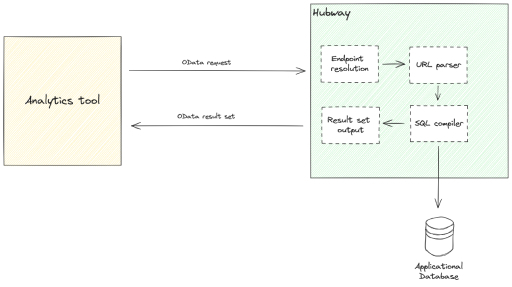
At the Endpoint Resolution layer, the engine extracts the following information from the URL:
- Which Hubway project, and which project version, is being accessed?
- What kind of request is this (GET, POST, PUT, DELETE, PATCH)?
- Is the request allowed based on the project's authentication and authorisation settings?
At the URL Parser layer, as the name implies, Hubway parses the URL to find:
- Which resource is being queried?
- What filters, pagination, sorting, and other OData operations are being applied to the resource?
The URL Parser layer builds an internal model of the resource and operands extracted from the URL. This internal model enables the next layer to compile a SQL query to retrieve the result set from the database.
The SQL compiler translates the OData request into an optimised SQL statement to execute on the database. All supported OData operations, such as filtering, sorting, pagination, and even relationship expansion, are executed directly on the database, ensuring top performance and throughput.
At the last step of the Hubway engine, the Result Set Output layer, the records read from the SQL execution are formatted into JSON according to the OData protocol, ensuring compatibility with a wide range of analytics tools.
Technologies used
- Power BI: The primary target program for Hubway Connect facilitates data analysis.
- OData: A fundamental standard that underpins Hubway Connect's connectivity, ensuring compatibility with a range of analytics tools.
- Microsoft's ODataLib: Used to parse OData requests.
Conclusion
Hubway Connect represents a groundbreaking solution in OutSystems connectivity, revolutionising how data is extracted and analysed. By bridging the gap between disparate technologies, Hubway Connect empowers organisations to unlock the full potential of their data assets without cumbersome development efforts. Technical challenges marked the journey to achieving this feat. Still, the result - a seamless, no-code connectivity solution - has proven immensely rewarding for developers and end-users alike. With Hubway Connect, the era of extreme connectivity without development has arrived, ushering in a new era of data-driven decision-making for OutSystems applications.